
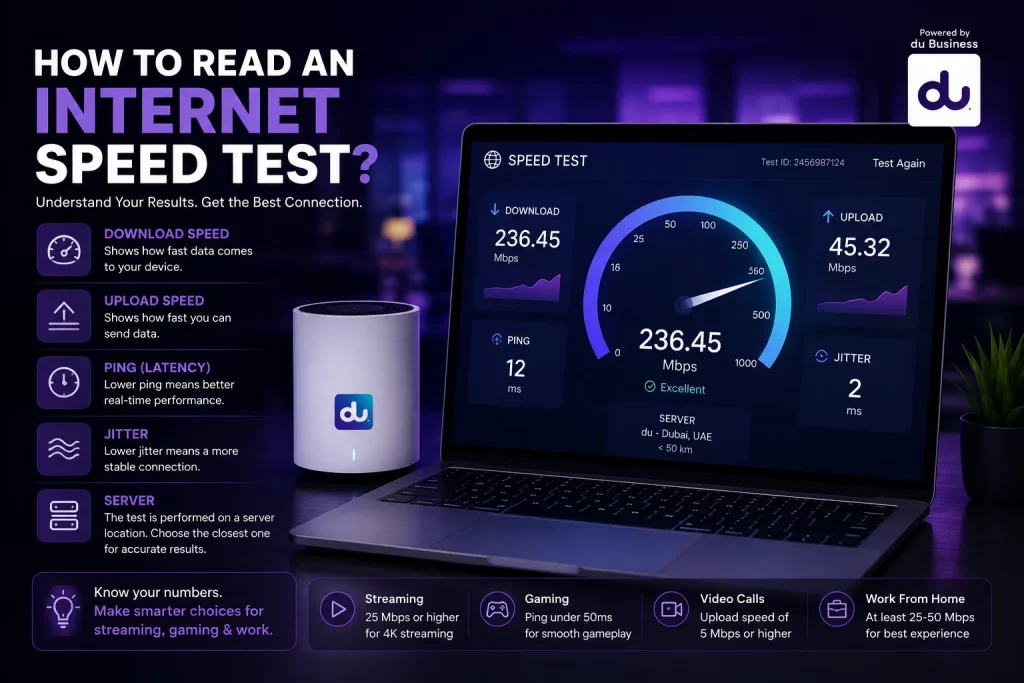
TL;DR
Slow or inconsistent connectivity can derail streaming, browsing, remote work, and gaming. Running a quick Internet Speed Test lets you measure key metrics (download, upload, ping, jitter, packet loss), compare them with what you’re promised, and take action. As an authorised reseller, we guide you through reading those results and show you how you can pick the right plan for you or your business.
How to Read an Internet Speed Test
In today’s digital age, your internet connection is nothing short of essential. Whether you’re streaming, working from home, gaming with friends or running a business from the UAE, a reliable connection matters. That’s why a simple Internet Speed Test can become your first line of defence when things aren’t working as they should.
At its core, a speed test gives you a snapshot of how your network is performing at that moment, but it also unlocks insights into whether your connection is keeping pace with your lifestyle or business demands. For our team, as an authorised reseller of du, helping clients interpret those results means matching them to the right plan.
1. Why a Speed Test Matters
A quick Internet Speed Test has several benefits:
- Verify what you pay for: It shows whether your speed meets the subscription you have.
- Diagnose issues early: Unexpectedly low numbers signal problems before they become major disruptions.
- Compare provider performance, especially when picking or upgrading services.
- Inform business decisions: For enterprises or homes with many users, consistent network reliability is key.
Because of this, understanding the outcomes of the test and how they affect your real-life activities is just as important as running it.
2. What a Speed Test Measures
When you hit “Start” on a test, you’re really checking what the speed test measures: several core metrics:
- Download speed (measured in Mbps) — how fast data moves to your device.
- Upload speed — how fast your device sends data out.
- Ping/latency (in milliseconds) — the reaction time for data to go out and come back.
- Jitter — variations in ping over time, which reduce consistency.
- Packet loss — when data packets fail to reach their destination, causing errors.
Each metric tells a different story about your network’s health. Understanding them is central to Reading Internet Speed Test results.
3. How to Perform a Reliable Speed Test
To get meaningful results, follow these steps:
- Connect your device via Ethernet if possible (wired is most accurate).
- Make sure no other devices or large downloads are running.
- Disable VPNs or other network-intensive tools temporarily.
- Choose a test server that’s close to your location.
- Run the test several times at different times of day (peak vs off-peak) to spot patterns.
These steps help ensure your results reflect your actual network performance and not just temporary interference.
4. Reading Internet Speed Test Results – What Each Number Means
Once the test completes, you’ll see numbers. Let’s break them down:
Download Speed
This is how fast you receive data. Streaming HD video, loading webpages, and downloading files depend on strong download speeds. A result significantly below your plan may mean underperformance.
Upload Speed
This matters especially for video calls, sharing large files, or cloud-based work. Even if the download speed is good, poor upload speed can make your experience lag.
Ping (Latency)
Ping measures the delay; the lower the number, the better. For real-time tasks like gaming or remote business calls, you ideally want a ping under 50 ms. Higher ping can feel like lag.
Jitter
Jitter is the variability in ping. If ping jumps all over the place, you’ll notice broken call quality or video stuttering. Consistent ping is crucial.
Packet Loss
Even a small percentage of packet loss (e.g., 2 %) can cause dropped words in calls, missing frames in video, or general instability.
Advertised vs Actual Speeds
Your provider will advertise a headline speed (e.g., 500 Mbps). But multiple factors mean you might not hit that number every time, especially via Wi-Fi. Wired tests are more reflective of maximum potential.
5. Common Causes of Slow Speeds and What to Watch For
If your results are low, it’s time to investigate. Here are common trouble spots:
- Router/modem is old or poorly positioned — interference weakens Wi-Fi or limits performance.
- Many devices use the bandwidth simultaneously — each device shares capacity.
- Network congestion during peak hours — many households online at once can slow speeds.
- Distance from the router or signal obstructions — walls, floors and other electronics can trap Wi-Fi.
- Using Wi-Fi rather than Ethernet for the test — Wi-Fi adds variability.
- Background downloads or updates — hidden activity can skew results.
- Server choice for speed test — a distant server may inflate ping and affect upload/download values.
Spotting and resolving these issues helps you interpret your test more accurately and decide whether the issue lies with your equipment, internal network, or the service itself.
6. Why Compare Actual vs Advertised Speeds
As an authorised reseller of du, we emphasise this part: you should be getting value for what you pay. If your Internet Speed Test shows large gaps between the headline speed and the results, you have a reason to ask questions.
- If your download/upload speeds are more than 10-15 % below the plan, you may not be getting the full benefit.
- If ping or jitter is high, then responsiveness and reliability suffer even if download numbers look okay.
- If issues persist across different devices and times of day, it’s likely not just a temporary blip.
By using your test results as evidence, you can explore a better plan or improved equipment, especially through certified du reseller channels.
7. How We Can Help (du Authorised Reseller)
As a du authorised reseller, our role is to guide you:
- We help you run a proper speed test and interpret the results.
- Advise if your network gear needs upgrading or repositioning.
- Offer the right du internet plan based on your test and use case (streaming, gaming, remote work).
- Assist with switching, faster upgrades, and ensuring your network keeps pace as demands grow.
- Monitor long-term testing data and check for consistency across devices, times, and locations.
This holistic approach helps you move from merely running a speed test to truly understanding what the numbers mean for your lifestyle or business and acting on that insight.
8. Summary & Next Steps
A speed test is more than just a number on a screen; it’s a window into your network’s health. Knowing how to perform the test and, more importantly, understanding what it tells you is essential in today’s connected world.
We recommend:
- Run a speed test monthly and during peak hours.
- Perform both wired (Ethernet) and wireless tests.
- Compare your results with your plan’s headline speed.
- Watch for consistent issues with ping, jitter or upload speeds.
- If issues exist, reach out to us as an authorised reseller; we’ll help you interpret your test and upgrade your plan or equipment where needed.
Ready to Talk?
If your Internet Speed Test results raise questions, or you simply want to explore a better internet plan, chat with our experts. We partner with du to deliver strong, reliable connectivity solutions that meet your growing needs, whether at home or in business.
FAQs
1. What does an Internet Speed Test measure?
It measures your connection’s download speed, upload speed, ping, and jitter to show how fast and stable your internet is.
2. How do I read my Internet Speed Test results?
Check your download and upload speeds for performance and ping for responsiveness. Lower ping and higher speeds mean a better connection.
3. Why are my speed test results lower than expected?
Wi-Fi distance, network congestion, or background devices can slow results. Use a wired test for more accurate readings.
4. How often should I run an Internet Speed Test?
Run a test monthly or when your internet feels slow. It helps ensure you’re getting the speeds promised by your du internet plan.
5. What should I do if my speeds are low?
Restart your router, reduce connected devices, or contact a du authorised reseller to upgrade to a faster plan.